A practical podcast studio starts with a quiet room, a suitable microphone, headphones, and a repeatable recording routine, not an expensive renovation. For Hindi-speaking podcasters in India, this guide explains how to choose locally available equipment, plan a budget in US dollars, and record solo episodes or remote conversations with Zencastr. Start with the format you want to publish, then buy only what helps you deliver it consistently.
What Do You Need for a Podcast Studio at Home?
You need a quiet recording space, a microphone connected to your computer, headphones, and recording software. A solo setup can use one USB microphone. An in-person interview works better with a microphone for each speaker and an interface with enough microphone inputs. Speaking close to the microphone in a suitable room keeps speech clearer than recording from across a reflective space.
Before shopping, choose your usual episode format:
- Solo Hindi commentary: Start with one microphone and an outline you can read without turning away from it.
- Remote interviews: Give each participant a quiet space and headphones, then capture separate recordings through Zencastr.
- Two-person conversations in one room: Plan for two microphones, two stands, and a tested headphone-monitoring arrangement.
- Video podcasts: Add stable camera placement and deliberate lighting after your audio workflow is working.
Write down your first three episode ideas. A storytelling show and a lively interview series may need different seating, even when they use similar equipment. For a fuller shortlist by budget level, see our guide to podcast equipment in India.
Choose the Room Before the Equipment
For a home studio in India, test the spaces you already have before ordering acoustic products. Record the same short introduction in a bedroom, a study, and a living room. Listen for traffic, ceiling fans, appliance hum, and the hollow sound of reflected speech.
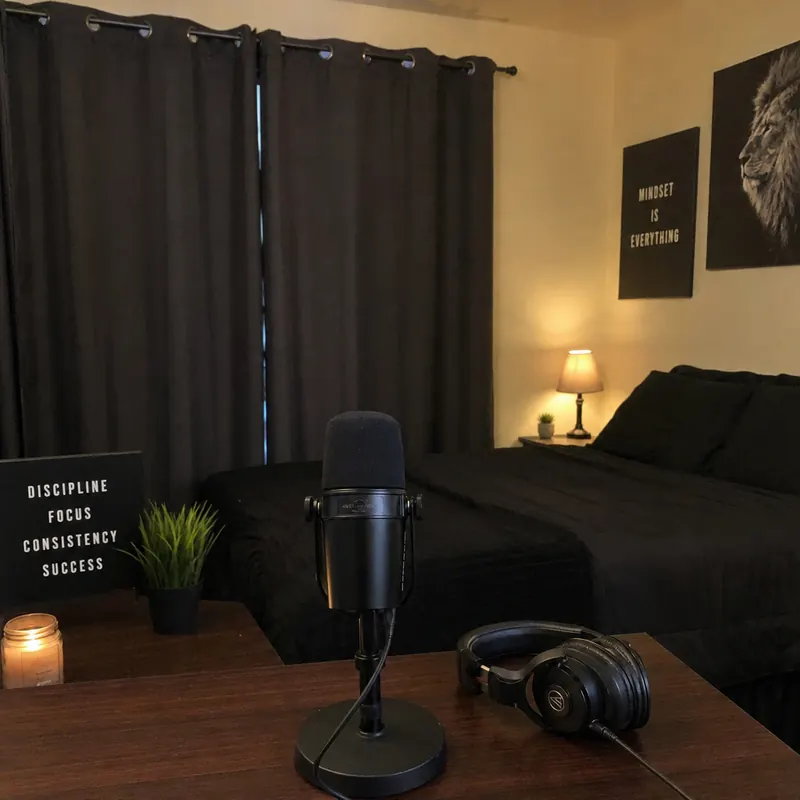
A quiet, soft-furnished room usually beats an empty room with bare surfaces. Microphone placement cannot fix the room itself, and background noise needs attention at its source. Move closer to the microphone rather than expecting it to isolate a distant voice.
Try this room-selection exercise:
- Check your intended recording time: Compare morning and evening conditions instead of judging the room once.
- Record with normal ventilation: Test the fan or air conditioner you realistically need during a full conversation.
- Choose a repeatable position: Mark where the chair and microphone sit so each episode starts from the same arrangement.
- Change one thing at a time: Compare recordings after moving your desk or adding curtains and soft furnishings you already own.
Do not sacrifice comfort just to silence a fan. Find a workable balance, then check whether listeners can understand every word without straining. Our step-by-step home studio guide covers layout, acoustic treatment, and lighting in more depth.
Build Around Equipment Available in India
Keep the first purchase list short. The Samson Q2U and the Focusrite Scarlett 2i2 are both sold through Indian audio retailers. Check stock, the exact model, included accessories, and warranty terms before paying.
A Straightforward Microphone for Solo Recording
The Samson Q2U is a dynamic microphone with USB and XLR connections and a zero-latency headphone output. USB connects directly to a computer, while XLR gives you a path into an interface later. Direct monitoring lets you hear your own microphone without a distracting delay.
For a solo Hindi show, start with USB rather than buying an interface immediately. Confirm which cable comes with the Indian listing, especially if your laptop needs a different connector. Check the stand and windscreen too, because sellers do not always supply an identical bundle. Compare other options in our roundup of the best podcast mics in India.
An Interface for Two In-Person Speakers
The fourth-generation Focusrite Scarlett 2i2 has two microphone preamps, so it can record two microphones together. Connect each microphone by XLR and set your recording software to keep each input separate. That gives you control over each person's level during editing.
Budget for the surrounding essentials, not just the interface. Ask your supplier to confirm compatible XLR cables, stable microphone stands, and a headphone arrangement that lets both speakers listen comfortably. Test the complete chain before inviting a guest. If your guests move around or record on location, see our picks for the best mic for interviews.
For either setup, use wired, closed-back headphones while recording. Monitoring helps you catch problems while there is still time to fix them, rather than discovering them during editing.
How Much Should You Budget for a Podcast Studio in India?
Base your podcast studio budget on how many people record together and what equipment you already own. The ranges below are rough planning envelopes, not retailer quotes, and they exclude a computer, room rental, structural sound isolation, and internet service.
- Solo audio corner
- Planning range: about $180 to $300
- Spend on: one USB microphone, headphones, a stable stand, and the cables you need
- Two-person audio setup
- Planning range: about $500 to $850
- Spend on: two microphones, a two-input interface, stands, cables, and monitoring
- Basic video additions
- Planning range: about $80 to $200 extra
- Spend on: camera support and lighting, reusing a camera you already own where possible
Use these ranges to request itemized local quotes. Compare the delivered total, warranty coverage, and included accessories, not just the microphone price. Keep some money aside until a pilot recording shows what actually needs improving.
Skip decorative lights or a large desk until your sound is sorted. In your first studio, the useful purchase is the one that fixes a problem you have actually heard.
Record Remote Hindi Conversations With Zencastr
Zencastr is a remote podcast recording and video podcast platform that records each participant locally on their own device and provides separate tracks. Its browser-based guest invitations make it worth testing when your host and guest cannot share a room. Local capture means you are not relying only on the live internet audio stream, although connectivity still matters for the conversation and uploads.
For example, plan a rehearsal between a host in Delhi and a guest in Lucknow before scheduling the interview. Send the guest a short preparation note: use headphones, choose a quiet room, connect power, and check the selected microphone. Zencastr strongly recommends headphones to help prevent echo and audio bleed.
Ask guests to speak naturally in Hindi rather than adopting a formal presentation voice. Agree on whether English technical terms need explaining and how you will handle interruptions. A relaxed rehearsal also gives less technical guests time to get comfortable.
Zencastr records each track locally and backs it up to the cloud as you record. Follow the upload instructions before closing the session, and review the current device requirements and plan details before your first full episode.
Make Hindi Speech the Recording Priority
Build your sound check around the way you actually speak. Read a passage that mixes Hindi sentences, English names, and any specialist vocabulary your show uses. Include an enthusiastic sentence and a laugh so you test more than your quiet introduction.
Start close to the microphone, use a windscreen or pop filter, and adjust the position while listening. Keep recording levels conservative rather than trying to make the waveform look as large as possible. These habits limit room pickup and leave headroom for louder speech.
Use a brief checklist before every episode:
- Confirm the input: Make sure the software has selected your intended microphone.
- Check the loudest voice: Rehearse an energetic line and watch for clipping warnings.
- Test the seating: Make sure each speaker can stay near their microphone comfortably.
- Remove interruptions: Silence notifications and tell others when recording starts.
- Listen back: Play the test through headphones before continuing.
For video, rehearse looking toward the camera without moving away from the microphone. Keep notes close to your sightline, and check that your framing stays comfortable throughout a conversation.
Edit a Pilot Before Upgrading
Audacity is a free audio recording and editing application for Windows, macOS, and Linux. It is a practical downloadable option for editing in India and can import and export common audio formats.
Make a pilot episode before buying more equipment. Edit obvious mistakes, listen to the complete conversation, and ask a Hindi-speaking listener where they struggled to follow it. Ask about clarity, pacing, and unexplained terms, not simply whether it sounded professional.
Keep untouched source recordings alongside your editing project. Name folders consistently so you can find the episode, guest, and final export without reopening every file.
Start Small and Improve Deliberately
Podcasting in India does not require a showroom-style studio. Choose a repeatable space, test your recording chain, and let your pilot guide the next purchase. For remote interviews or video conversations, try Zencastr with a short rehearsal before recording your first full episode.