The best mic for interviews depends on how you record: a clip-on lavalier for mobile shoots, a close-positioned desktop mic for remote conversations, or a boom-mounted shotgun for interviews with no visible microphone. For Indian creators, this shortlist focuses on practical recording situations, from home studios to location shoots. You’ll find specific picks, their limitations, and setup advice to help you choose equipment that fits your workflow—not just your camera bag.
Which Microphone Type Is Best for Your Interviews?
Choose a lavalier when your guest needs freedom to move, a desktop microphone when each participant can stay close to their own mic, and a boom-mounted shotgun when you want the microphone outside the frame. The best mic for recording interviews is the one you can position correctly throughout the conversation. Start with your recording location and guest arrangement, then choose the connection and accessories.
Use these scenarios to narrow your search:
- Seated interviews filmed on a phone: Consider a wired lavalier if a cable won’t restrict the guest. Check the phone’s microphone input before buying.
- Walk-and-talk videos: Choose a wireless system that lets the microphone travel with the speaker. Test reception along your intended route.
- Remote podcasts: Give each participant their own close-positioned microphone instead of relying on a laptop across the desk.
- Documentary-style interviews: Consider a shotgun on a boom above the guest, positioned just beyond the camera frame.
Treat the recommendations below as workflow-based picks. No single microphone sounds best in every room. They are based on documented features rather than a hands-on comparison.
Interview Microphone Picks by Recording Style
BOYA BY-M1: A Wired Starting Point for Simple Shoots
The BOYA BY-M1 is worth considering for stationary, single-person interviews when you want a straightforward clip-on microphone. It has an omnidirectional pickup pattern, a 3.5mm connector, and a six-meter cable. BOYA specifies different operating settings for smartphones and cameras, so selecting the right mode is part of setup—not an optional detail.
Its long cable gives you flexibility when framing a seated guest. However, plan the cable route before recording: keep it away from chair wheels and leave enough slack for natural movement. For your first test, have the guest sit, gesture, and turn as they would during the interview.
Choose it for: A fixed interview position with a verified compatible recording input.
Check before buying: A phone adapter must support microphone input. Also distinguish the original BY-M1 from similarly named models; BOYA lists different power requirements across the range. One lavalier attached to the guest should not be your plan for capturing equally clear questions from a distant host.
RØDE Wireless PRO: A Complete Two-Person Lavalier Option
If you want the best lavalier mic for interviews and care about included accessories and backup recording, the RØDE Wireless PRO kit is a strong pick. The kit contains two transmitters, one receiver, two Lavalier II microphones, a charging case, and wind protection. Its transmitters accept external lavaliers through locking 3.5mm inputs, giving you a choice between visible clip-on transmitters and smaller microphones on clothing.
The practical advantage is flexibility. You can put one microphone on the host and another on the guest without assembling a separate lavalier package. The locking connectors also help prevent accidental disconnection when someone adjusts their clothes.
Each transmitter supports onboard 32-bit float recording. That provides a separate recording path and greater flexibility when adjusting recorded levels in post-production. It does not remove the need to check placement, clothing noise, and wind before the conversation starts.
Choose it for: Two-person location interviews where external lavaliers and transmitter recordings are priorities.
Check before buying: Confirm the receiver connection suits your phone or camera, and practice retrieving the onboard files before an important shoot.
DJI Mic 3: A Wireless Option for Mobile Workflows
The DJI Mic 3 is another candidate for creators recording interviews across cameras, smartphones, and computers. DJI offers different bundles, including a two-transmitter, one-receiver package with a charging case. Select the bundle deliberately: a single-transmitter package does not provide a dedicated microphone for both interviewer and guest.
The transmitters support internal recording, including 32-bit float, and DJI provides options for saving original audio alongside processed audio. Keeping an original recording is useful if you later decide that the processing applied during capture was too strong. Make file retrieval and naming part of your rehearsal, not something you discover after recording.
Choose it for: Mobile interviews where internal recordings and flexible device connections fit your production process.
Check before buying: Verify your exact phone, recording app, and adapter. DJI states that direct Bluetooth connection to a phone supports only one transmitter at a time, so don’t assume Bluetooth alone will cover a two-person conversation. For two-transmitter interviews, verify the receiver-based workflow instead.
Shure MV7+: A Desk-Based Pick for Remote Interviews
The Shure MV7+ suits creators who usually interview guests from a desk. It is a directional dynamic microphone with USB-C and XLR outputs, plus a headphone connection for direct monitoring. USB offers a straightforward computer connection, while XLR gives you a route into a compatible interface or mixer.
Position it close to your mouth on a stable stand or arm. It is not a room microphone. For a remote interview, ask your guest to use their own microphone and headphones too. Close placement and a quieter recording space help keep unwanted room sound from competing with speech.
Choose it for: Regular remote interviews, solo introductions, and desk-based podcast recording.
Check before buying: Include a suitable stand in your equipment plan. Shure also notes that software settings do not affect the passive XLR output, so don’t expect USB processing to carry over automatically when changing connections.
What Is the Best Boom Mic for Interviews?
The RØDE NTG5 is a strong candidate for creators who want a dedicated shotgun microphone on a boom and can provide the required recording equipment. It uses a supercardioid shotgun pickup pattern and requires 48V phantom power. That makes it a different purchase from a plug-in phone lavalier. Check the recorder or interface as carefully as the microphone.
A boom setup lets you keep the microphone off the guest’s clothing. For a seated interview, position it above and slightly in front of the speaker, just outside the image, aimed toward their mouth. If the person moves, the microphone may need to move with them; a fixed stand works best when the interview position stays predictable.
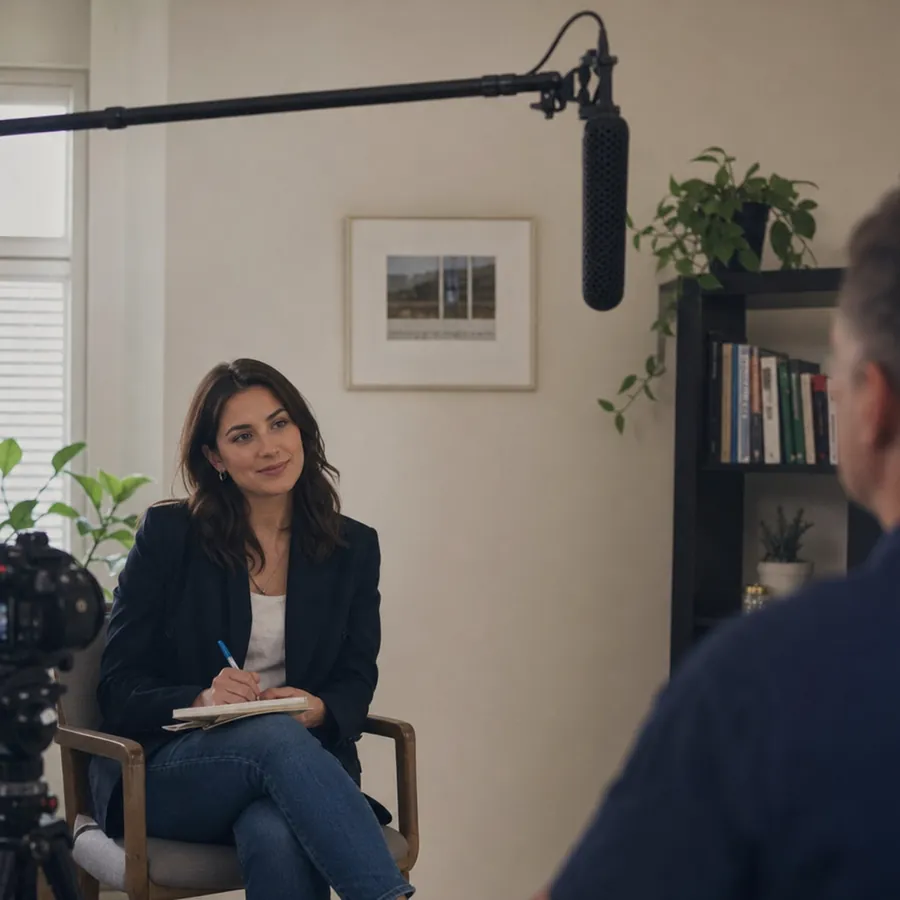
Budget for the complete arrangement: microphone, compatible phantom-powered input, cable, support, and appropriate wind protection. Before committing, rehearse with your actual camera framing. A wide shot may force the microphone farther away than a close-up, so test the sound with the composition you intend to use.
If you are a solo creator handling questions, framing, and recording at once, pick a setup you can monitor reliably over one that adds another positioning task.
Build a Podcast Mic Setup Around the Conversation
A useful podcast mic setup starts with the number and location of speakers. For remote interviews, plan for each participant to have an individual microphone and recording connection. For two people sharing a room, prioritize one microphone per speaker, close placement, and a way to monitor the recording. These choices help reduce unwanted spill and give you more control over the conversation’s sound.
A wireless podcast microphone can make sense for video-led conversations where visible desk microphones would interfere with the shot. However, wireless transmission introduces considerations such as physical obstructions and interference. Test it where you will record. A successful home test does not guarantee the same result at an event.
For remote production, Zencastr records participants on separate tracks and uses local recording with cloud backup. Separate participant tracks give you more editing control than a single combined conversation file. That complements a good microphone; it does not replace careful input selection or a short pre-interview test.
Ask each guest to complete a brief rehearsal using the same device, browser, microphone, and headphones they will use for the session. Make that rehearsal part of your invitation process, not a rushed task after everyone joins. It is also a good moment to finalize your podcast interview questions.
Make Your Location Work Before Upgrading Equipment
For an Indian creator, a useful buying test is your actual home office, a campus interview location, or a sheltered outdoor spot—not an idealized studio. Listen for whatever is present: traffic, nearby conversation, a ceiling fan, or air-conditioning. Choose the quietest practical position and bring the microphone closer before deciding you need a more expensive model.
For clothing-mounted microphones, pay attention to anything that can brush the capsule or cable. Ask the guest’s permission before making adjustments, then have them turn their head and gesture during the test. RØDE’s placement guidance emphasizes keeping lavaliers close to the sound source while avoiding clothing rustle and gusts of air.
Use this pre-recording checklist:
- Confirm the input. Record a sample with the complete microphone, cable, adapter, and app combination you intend to use.
- Test both voices. Ask the host and guest to speak normally, then laugh or deliver a more animated answer.
- Check movement. Listen while the guest shifts position; correct cable tension or clothing contact before continuing.
- Add wind protection. For outdoor recordings, fit suitable protection and test it in the actual position.
- Verify backups. Where onboard recording is available, confirm it is running and that you know how to retrieve the files.
- Play the sample back. Listen through headphones. A moving level meter alone does not tell you the recording is clean.
When shopping in India, ask the seller to confirm the exact model, included adapters, warranty terms, and service process in writing. Compare the complete usable kit, not just the microphone listing. Put essential accessories on your purchase checklist so you don’t discover a missing connection on interview day.
Choose the Setup You Can Use Confidently
Start with the recording situation. Consider the BOYA BY-M1 for a simple wired interview, the RØDE Wireless PRO or DJI Mic 3 for mobile conversations, the Shure MV7+ for desk-based recording, and the RØDE NTG5 for a dedicated boom workflow. Each solves a different production problem, and none removes the need for a sound check.
Before upgrading, record a short interview with your planned arrangement and listen back. Let the problems you actually hear guide the next purchase. If you are still choosing a general podcast mic, see our best podcast mic in India picks.
Ready to put your interview setup to work? Try Zencastr.