The best studio headphones for podcasting let you hear speech clearly, stay comfortable, and work reliably with your recording setup. For Indian podcasters creating in English, Hindi, or both, this guide explains what to prioritize, which models available in India to shortlist, and how to test them before you commit. Start with your recording needs rather than a prestige label.
What Makes Good Studio Headphones for Podcasting?
Good studio headphones help you judge voices, limit sound leakage, and stay comfortable through recording and editing. For most podcasters buying a first pair, wired, closed-back headphones are a practical starting point. Closed earcups help with isolation, and a wired connection avoids the extra latency that comes with Bluetooth. These priorities matter more than an impressive-looking spec sheet.
Think about your actual production routine. Are you recording solo explainers at a desk, interviewing guests remotely, or carrying equipment between locations? Write down the problem you need headphones to solve before comparing models.
If you create in Hindi, make your own voice part of the audition. Bring a recording with everyday Hindi, English names, and any code-switching typical of your show. Judge whether the pair helps you make confident editing decisions, not whether it makes every voice sound bigger.
Closed-Back vs Open-Back: Choose for Your Recording Room
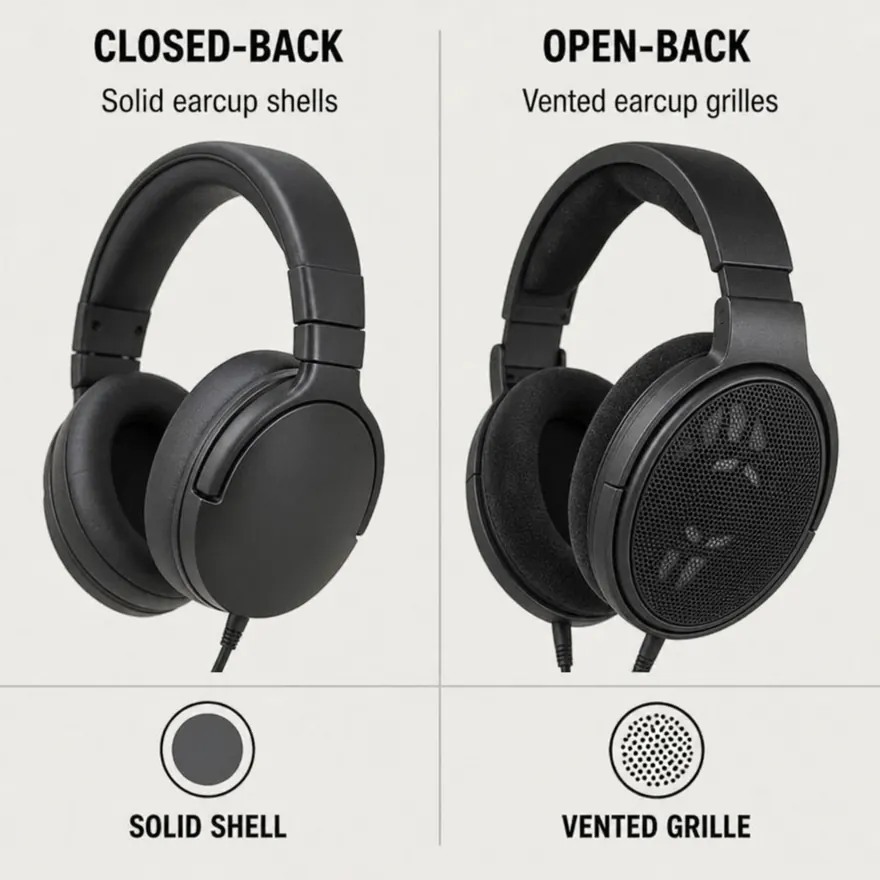
Closed-back studio headphones have enclosed earcups that help keep sound from escaping toward your microphone. Open-back designs let sound pass through the earcups and can sound more open, but that leakage makes them a poor match for a live microphone. As Shure's headphone guide explains, closed-back pairs are the usual choice while recording because their isolating design helps prevent bleed. If one pair must handle both recording and editing, start your search with closed-back models.
In an Indian home setup, audition headphones where you expect to work. That might be a bedroom with a ceiling fan, a shared flat, or a workspace near traffic. Check whether you can follow quiet speech without constantly turning up the volume.
Keep monitoring and recording separate in your mind. Headphones help you hear the session, but they do not replace a quieter room or good microphone placement. During your test, listen to the recorded file instead of assuming that a quieter experience inside the earcups means your microphone picked up less noise. Our podcast studio setup guide covers the room side of the equation.
Prioritize Fit, Connections, and Everyday Usability
Before paying for professional studio headphones, check how they fit into a complete session. Comfort matters, especially when recording is followed by a long editing block. Give fit the same attention you give sound.
Use this checklist when comparing studio monitor headphones:
- Fit with your normal accessories: Wear your glasses and usual hairstyle. Turn your head, read aloud, and check for pressure around your ears or the top of your head.
- A compatible connection: Match the headphone plug to the output you will actually use. Check whether an adapter is supplied rather than assuming it is.
- Manageable cable routing: Measure the distance from your headphone output to your chair. Leave room to move without dragging a long cable across the keyboard or mic stand.
- Maintenance options: Ask the seller about replacement earpads and model-specific cables. Get availability confirmed before treating repairability as a buying benefit.
- Clear purchase terms: Check delivery to your PIN code, invoice details, warranty handling, and whether an opened pair can be returned for fit reasons.
Don't buy on impedance alone. Headphone sensitivity and the output of your source also affect how loud a pair will play. If possible, audition the headphones through your own laptop, microphone headphone socket, or audio interface rather than a shop's different setup.
Which Studio Headphones Should Indian Creators Shortlist?
Three options worth comparing are the Audio-Technica ATH-M20x, the Audio-Technica ATH-M40x, and the Behringer BH470. All are sold in India, although seller stock and delivery arrangements vary. Treat them as a needs-based shortlist, not a claim that one model is best for everyone.
Audio-Technica ATH-M20x: A Straightforward Starting Point
The ATH-M20x is a wired, closed-back model with a single-side cable exit. Audio-Technica India positions it for studio tracking and mixing. Consider it if you want a simple pair for desk-based recording and don't need interchangeable cables.
During an audition, pay attention to cable length and voice playback. Read a short introduction, listen back, and decide whether the fit suits the way you sit and speak. Choose it because it meets your needs, not just because it is the entry point in a familiar range.
Audio-Technica ATH-M40x: Consider It for Detachable Cables
The ATH-M40x adds a detachable cable, a collapsible design, and swiveling earcups. Audio-Technica describes its tuning as flat for accurate monitoring. These features make it worth a look if packing, cable choice, and regular editing are priorities.
Ask yourself whether you will use those features often enough to justify the extra spend. A detachable cable may be useful for your routine, while swiveling earcups may matter less. Don't stretch your budget just to move higher in a product range.
Behringer BH470: Check the Exact Listing Carefully
Behringer describes the BH470 as compact, closed-back studio monitoring headphones with a foldable design. It belongs on your list if you want to compare another brand alongside the Audio-Technica options.
Confirm the exact model, package contents, delivery timeline, and warranty route with the seller. Compare the final checkout total rather than an overseas headline price. This matters most when you are choosing between a locally stocked pair and an imported listing.
Test Headphones With Your Voice, Not Just Music
Build a repeatable audition using the same files and the same playback device. Keep the volume comfortable and roughly the same for each pair. Your goal is to find the headphones that help you work, not the ones that sound most dramatic at first.
- Play an unprocessed voice recording. Use your normal speaking voice, including Hindi or Hinglish if that reflects your content. Note whether words stay easy to follow without adjusting playback.
- Include a difficult passage. Try a quiet sentence, an energetic introduction, laughter, and words with strong "s" or "sh" sounds. Compare how easily you can spot what needs attention.
- Record while listening. Play a guest's voice through the headphones while recording your microphone, then check the result for leakage. Zencastr recommends setting the volume high enough to hear others clearly but not so high that it bleeds into your mic.
- Recreate your working posture. Type an edit note, look toward a second screen, and reach for your controls. Check whether the cable pulls or the earcups shift.
- Score before switching. Rate each pair for voice clarity, comfort, connection convenience, and purchase support. Add one sentence explaining each score.
If you can't audition in person, confirm the retailer's return conditions before ordering. Don't assume a pair can be returned just because the fit doesn't suit you.
Put Your Headphones to Work in Remote Recordings
Zencastr is a remote podcast recording platform built for interviews with participants in different locations. According to its recording FAQs, each track records locally in full quality and backs up to the cloud as you record, and headphones are strongly recommended to help prevent echo and audio bleed. You can read more about how that works on the Zencastr recording page.
Before inviting a guest, run a short practice session. Select your microphone and headphone output, then ask the guest to confirm their own devices. Zencastr recommends that everyone wear headphones or earbuds rather than use computer speakers, and wired headphones are preferred over Bluetooth for latency.
Keep guest instructions simple: connect headphones, join the session, and speak normally for a brief test. Listen back before starting the main conversation. For Hindi-language interviews, share the setup steps in Hindi if that makes your guest more comfortable. If you are still choosing the microphone to pair with your headphones, see our guide to the best podcast mic in India.
Choose for Your Next Episode
The best studio headphones are a practical match for your voice, recording space, and routine, not a reward for spending more. Shortlist a few options available in India, test them consistently, and pick the pair you can comfortably use every week. Once your monitoring feels dependable, turn your attention back to the conversation.
Ready to record your next interview? Explore Zencastr and put your headphone setup to work.